

FAQ
No. Before a round starts, Rugbet commits to the server seed. After the round settles, it reveals the seed and transcript so you can verify the result.
Open the Provably Fair modal inside the game after a round settles. It shows the commitment hash, the revealed seed, and the transcript hash. Confirm
SHA256(revealed seed) = commitment — any standard SHA-256 tool works.A SOL-funded wager is held in on-chain custody for the round. Payouts and refunds go only to the wallet used to fund it. Rugbet never holds or controls your private keys.
The round settles first. For SOL-funded play, the payout then settles on-chain. If a payout is delayed, it remains pending; contact support with the round ID from the Provably Fair modal.
Currently:
Lasers (Higher/Lower), read the number, call Higher or Lower, build the multiplier, then cash out after at least one correct call.
Climb (Tower), pick a tile, climb the tower, and cash out after a safe step.
Rise (Crash), watch the multiplier and cash out before the crash.
Multi Climb (Multiplayer Tower), shared tower, shared spike layout. Beat the clock.
Lasers (Higher/Lower), read the number, call Higher or Lower, build the multiplier, then cash out after at least one correct call.
Climb (Tower), pick a tile, climb the tower, and cash out after a safe step.
Rise (Crash), watch the multiplier and cash out before the crash.
Multi Climb (Multiplayer Tower), shared tower, shared spike layout. Beat the clock.
Rugbet is unavailable in certain jurisdictions for legal and regulatory reasons. See the Terms page for the full list of restricted regions.
- This feature is currently only available on Rugbet using Solflare wallets, but will be available on other wallets in future.
- Create or switch to a Burner Wallet in Solflare. Auto-approve is only available for burner wallets and cannot be enabled for primary wallets.
- On the wallet connection popup, click the Auto-approve checkbox and approve the initial connection request.
- On the Solflare app on mobile you must manually add auto-approve after connecting your wallet. To do this open Settings → Security → Manage Apps, select Rugbet, then enable the Auto-approve slider.
- Disable auto-approve from the Manage Apps menu when it is no longer required.
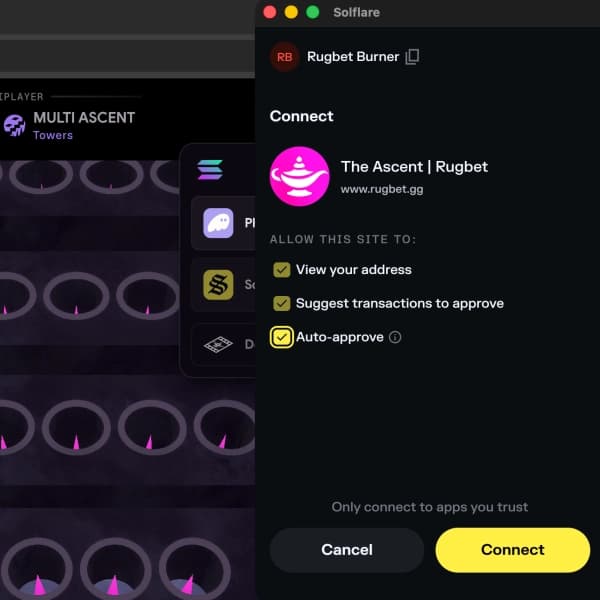 Auto-approve on desktop connection
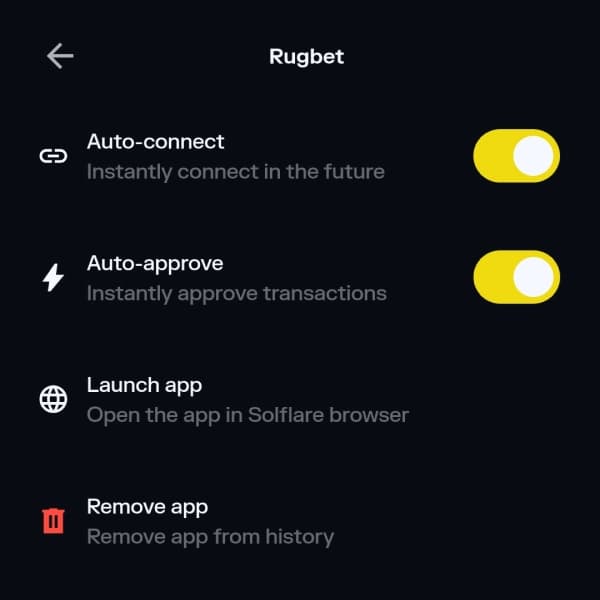 Auto-approve in Solflare app settings